How to Run Calibrations in the AI Era
AI can turn calibration prep into a focused pre-read, helping committees spend less time getting oriented and more time making fair, well-supported decisions.

Calibration exists to standardize ratings across managers and departments. Managers grade differently, some harsh and some generous, so you put them in a room together and make them defend their numbers until “exceeds expectations” has a similar meaning across all teams and departments. Then, important decisions like compensation and promotions rest on the result.
The problem has always been where the time goes during calibration sessions. With 9 people, 3 hours in a room, and 60 employees, most of that time block is spent on orientation. Reading each packet. Working out who this person is and which team they sit on. Noticing a rating that says 5 while the written review says “needs to communicate more clearly.” Registering that one manager gave everybody a 4.
The judgment calls get whatever time is left. A 2024 Harvard Business Review article found that the people discussed early in a session got longer conversations and more considered ratings than the ones at the end once managers were running short on time.
Orientation work is reading everything and noticing what repeats across all of it. A room full of people is bad at that because of the time it takes to read one packet at a time, and the effort it takes to synthesize and extrapolate that information to recognize patterns that exist across the whole organization. That is the part you can hand to an agent now, and it changes what the time during a live meeting is spent on.
Here is what running calibrations with Windmill looks like.
Windy flags what needs discussing before the meeting
Somebody on the HR team usually does this by hand. You open all 60 packets the week before the session and keep a running list of the ratings that don’t hold up against the written review and the managers whose numbers sit apart from everyone else’s. That’s at least an afternoon of work, and there are blind spots to this manual form of pattern recognition.
Windy makes that pass before the session and surfaces the discrepancies it finds in a pre-read:
- Ratings that do not match the written evidence, and gaps between what the manager said and what peers, reports, and the employee said
- Managers whose ratings trend high or low against their peers
- Teams applying the rating scale unevenly
- Ratings with thin evidence behind them
- An actionability score from 1 to 5 on each manager’s feedback, based on whether it gives specific behavioral examples and concrete next steps. Top-rated employees scoring 3 or lower get flagged as under-coached
- Developmental misalignment, where a manager’s growth themes diverge from what the employee said about themselves
- The reviewees and the specific questions that merit closer committee attention
It reads all 60 start to finish and holds every one of them at once, so a manager who gave everybody a 4 shows up as a flagged pattern instead of something a committee member happens to remember.
Facilitators can email the pre-read to the whole committee, usually 24 to 48 hours before kickoff, and can regenerate it as more reviews land. The committee is able to walk in prepared, knowing which 12 people warrant discussion and where they stand on each, instead of spending the meeting getting oriented.
A live sandbox for the committee
A calibration in Windmill is its own working space. Nothing you do inside it touches the underlying review until someone submits, so the committee can move ratings around and argue about them without anything reaching the employee or the manager.
There are two roles: Facilitators who see everything, propose the answer changes, resolve threads, manage settings, and submit. Committee members who see the packet contents and comments. Reviewees see none of it, only their final manager review. Access is set per calibration, so being an Admin does not automatically give you access.
Commenting works similarly to the way it does in a Google Doc. Comment on any visible question, anchor a comment to a specific passage of the written review, and reply in threads. Every comment thread sits alongside the proposed changes in one panel, filtered to unresolved conversations or to a single reviewee when the list gets long. Text answers stay with the manager and cannot be rewritten from inside a calibration.
There are four views within the calibrations workspace:
- People for going packet by packet, with the self, peer and upward, and manager reviews in one place
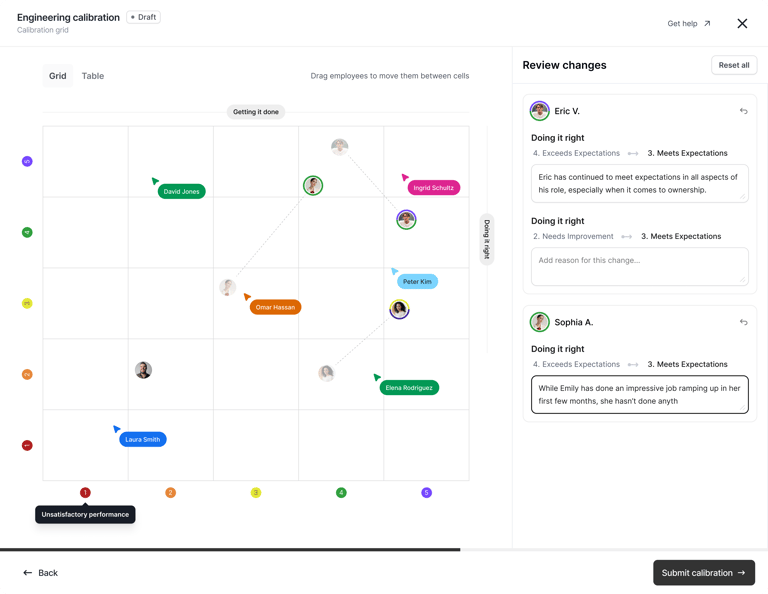
- Grid for the 9-box, or a 25-box on a five-point scale, with focus mode and a before-and-after state as people move
- Table for large populations, with filters by manager, job title, employee attributes, and review lock state
- Insights for the distribution before and after, against a target curve that can be a bell, top-heavy, or fully custom
There is a shared timer on screen that can be set per person, for teams that want to hold each discussion to a few minutes. And it is collaborative in real time, down to seeing another committee member’s cursor move across the grid.
A 9-box that isn’t just one manager’s opinion twice
A 9-box is a 3x3 matrix that asks a manager to rate someone on two scales, then plots one rating against the other. Both numbers came from the same manager, in the same sitting, working from the same memory of the last six months. So in some ways, the grid shows you one manager’s opinion twice.
However, Windmill pulls from the tools your team already works in and allows you to view one axis as the manager’s rating and the other as something the person did. Linear points completed. Sales quota pushed in through our API. The same review question from last cycle, if what you want is the trend. The people worth talking about are the ones where the rating and the work do not line up.
Live, async, or both
Run calibrations live and a facilitator can share their screen, working through packets or comparing ratings in the grid. Live calibration sessions are still the most common practice.
However, the other option is to run calibration sessions async and have participants review packets and comment on their own schedule. Facilitators then make the proposed answer changes and own the final decisions.
Async has no queue, so nobody is employee 87 at 4:45 pm. In a live session the first rating somebody says out loud becomes the number everyone else argues against, and sometimes the loudest voice in the room wins. Asynchronously, everyone gets the same comment box. The manager who needs a minute to think, or who will not talk over anybody, writes their case out and it gets weighed on what it says.
What the async format handles poorly is closure. Two people disagreeing in a thread can go on indefinitely without someone present to say we are going with the 4 and moving on.
So the teams that run calibrations well use both, in this order: send a pre-read out 48 hours ahead. The async round settles the calls nobody disagrees about, and in most populations that’s the bulk of them. Then the committee meets live to resolve the highest-priority cases: the disputed ratings, the promotion nominations, the threads that stalled, anything a manager escalated. Our guidance is that a well-run session runs 60 to 90 minutes.
Submitting is two independent decisions
When the calibration closes, you choose two things separately.
First, what happens to the ratings. Apply the changes directly, which is what most final rounds do, or send them to managers as recommendations they approve or reject one at a time. A manager who gets recommendations sees each proposed change with the reasoning attached, and takes or rejects each one.
Second, what happens to the comments. Keep them with the committee, or share them with managers. You can resolve individual comments before submitting so the ones meant for the room stay in the room.
A confirmation screen tells you how many managers and how many reviews are about to be affected. Reviews that receive recommendations or shared comments unlock automatically, and every question carries its full history, so six months later there is an answer for why a rating moved and a name attached to it.
Submitting a calibration is separate from sharing reviews with employees.
Rounds ladder up
You can calibrate more than once in a cycle, and have each round be its own calibration. Duplicate the one you just closed from its Actions menu and the next round opens on the numbers the last one produced.
The order matters if you sent recommendations instead of applying changes. A recommendation sits with the manager until they take it or reject it, one at a time, and an approval lands on the review immediately. Wait for that to finish before you duplicate, or the next committee will be arguing about ratings that may still move. Any review that received a recommendation gets unlocked automatically, so filtering the table by lock state shows you what is still open.
The pattern for a 500-person org might be department or level rounds first, then company-wide once managers have responded. The early rounds are where the comment threads happen and where recommendations go out. The last round usually applies changes outright, with the committee watching the distribution in the table view instead of going person by person.
Your agent can reach it too
Windmill ships an MCP server and a full API, so an agent can reach the platform. Export the whole calibration, work through it wherever you prefer, push the results back in.
What stays human
The pre-read flags areas of discussion. It does not make calibration decisions, and only a facilitator can move a rating.
Everything Windmill does here happens before the judgment calls start. Windy reads all packets and hands the committee a short list of who needs discussing and why. The async round settles the calls nobody disagrees about. The grid puts each rating next to what that person shipped. By the time people are in a room together, the only thing left on the agenda is the part that humans are best at.
Calibration used to be hours of getting oriented followed by whatever discussion you still had energy for. Now it can be a short meeting about a specific group of people, with a written record of why every rating moved and who moved it, and nobody’s number depends on where their name fell on the list.
If this sounds like a better way to run your next calibration, book a demo to see Windmill in action.
Stay in the loop
Get the latest updates, insights, and news from Windmill delivered to your inbox.